
Layne's Guide to Online Privacy
How to Recognize the Digital Panopticon and Bulletproof Your Personal Life Against It


Intro: It’s Never Been This Bad Before.
Here’s something new I’m trying, suggested listening:
If there’s one thing the Soviet Union should be famous for, it’s their awe inspiring surveillance state. Soviet domestic intelligence gathering was conducted on a scale that is hard to comprehend given the massive population, limited industrialization, and relatively small economy of most Soviet states. Consider: Every phone line was tapped, every room was bugged, every street hid KGB agents lurking in the shadows behind their Lada VAZ-2101. Nobody was safe. Even high level bureaucrats within the Party were constantly paranoid, believing their every move was documented in a file in preparation for the inevitable knock on the door in the night. For the average Soviet citizen merely trying to perpetuate his existence (preferably outside walls of the neighborhood death camp), it was a demoralizing, punishing, inescapable existence.
The Soviet system was cruel, it was cynical, it was predatory, it was evil incarnate. I mean, these are the guys that poured molten lead down the throats of priests to mock communion. But, it’s tradecraft has aged quite poorly in the decades since its collapse. Reflect on how they operated their evil empire: it might’ve been brutal but it was all so…archaic..vestigial even… Think about the limitations of the time; stalking your political opponents? In person? How barbaric! Indeed, the Soviets were the last great analogue oppressive regime, the last gasp of tyrants and bureaucrats who physically filed paper in physical filing cabinets, physically held the receivers for tapped phone calls to their ears, physically opened and physically read your mail, physically planted bugs in the apartments of bureaucrats caught ending their applause for Stalin one second early.
Today’s autocrats have greatly improved on the Soviet formula. For all their efforts, for all the 50,000,000 dead “dissidents”, for all their troubles, the Soviets never approached even 1% the domestic surveillance capabilities of the American government.
Mandatory Disclaimer(s)
Before I help you, I have to scare you a little. I have to show you how bad the problem is, and I have to be realistic about what you can do to improve your situation. And before that, I need to distance myself from any imaginable liability. I am a regular guy with no credentialing or experience that makes me more qualified to talk about this topic than anyone else. Nothing I say should be taken as legal advice, and I’m not responsible for anything I say that is wrong, harmful, or results in you getting rekt.
As you read this article, you’ll see that I have about a decade’s experience being a “privacy hobbyist”, and I’m going to serve up a broad survey of what I’ve learned in a way that you can understand and use. It’s up to you whether to trust my advice or not.

You Live in A Panopticon: Digital Surveillance Today
It is unbelievable how much surveillance is conducted on the average person. Not a suspected criminal, not a criminal enterprise kingpin, the random Walmart employee in Des Moines, Iowa is getting roughly 100,000,000,0002x more surveillance than even the most hated enemy of the Soviet Union. Let’s examine how:
Wifi sees through walls
This is not a joke: your router can see you through walls. Consider that Wi Fi works by blasting out radio signals to antennas in connected devices. Consider also that we have had RADAR, SONAR, LiDAR, etc. for decades…
The way WiFi radio waves bounce off of objects reveals their topography. At first, routers could really only see crude outlines— something like PS2 era video game graphics. Nowadays, Wifi can see you through multiple walls, see around corners, read sheets of paper in other rooms, and identify people and objects with 100% certainty.
I’m not exaggerating, and I encourage you to do your own research on the topic.

You live with a radar pinging your entire house, at all times, with a contract that says your Internet Service Provider (ISP) has unfettered access to the imagery captured and processed by your router. It can see when you shit, when you jerk off (as well as what you jerk off to, obviously) your gait when you walk, where you set your backpack down, and what position you like to fall asleep in. And where you store your guns. And how you hold your significant other at night.
It’s safe to say that your router, like most internet connected devices, knows you better than your spouse or immediate family.
All legal btw.
Ghost profiles and Digital Fingerprinting: Ring, Meta Pixel, AWS, Google Widevine, Port listening and SDKs
As a naive and sensitive young chud, you might be under the impression that you’ve evaded the worst of the surveillance by not using the products of the biggest offenders. “I don’t have social media, so that doesn’t apply to me!”, you chortle confidently, “Well, except for Snapchat…and iFunny..and Substack…and I guess I have a Boomerbook profile…”
If I’m addressing you, you’ve fallen into a carefully orchestrated public narrative control trap. Yes indeed, Meta (Facebook), Alphabet (Google), and other wardens of the digital panopticon have a file on you, even if you’ve never Googled a restaurant’s hours or stalked someone on Facebook.
I’ve long been a proponent of using the Lockdown DNS app on iPhone, allow me to demonstrate what happens when I launch good ole iFunny:
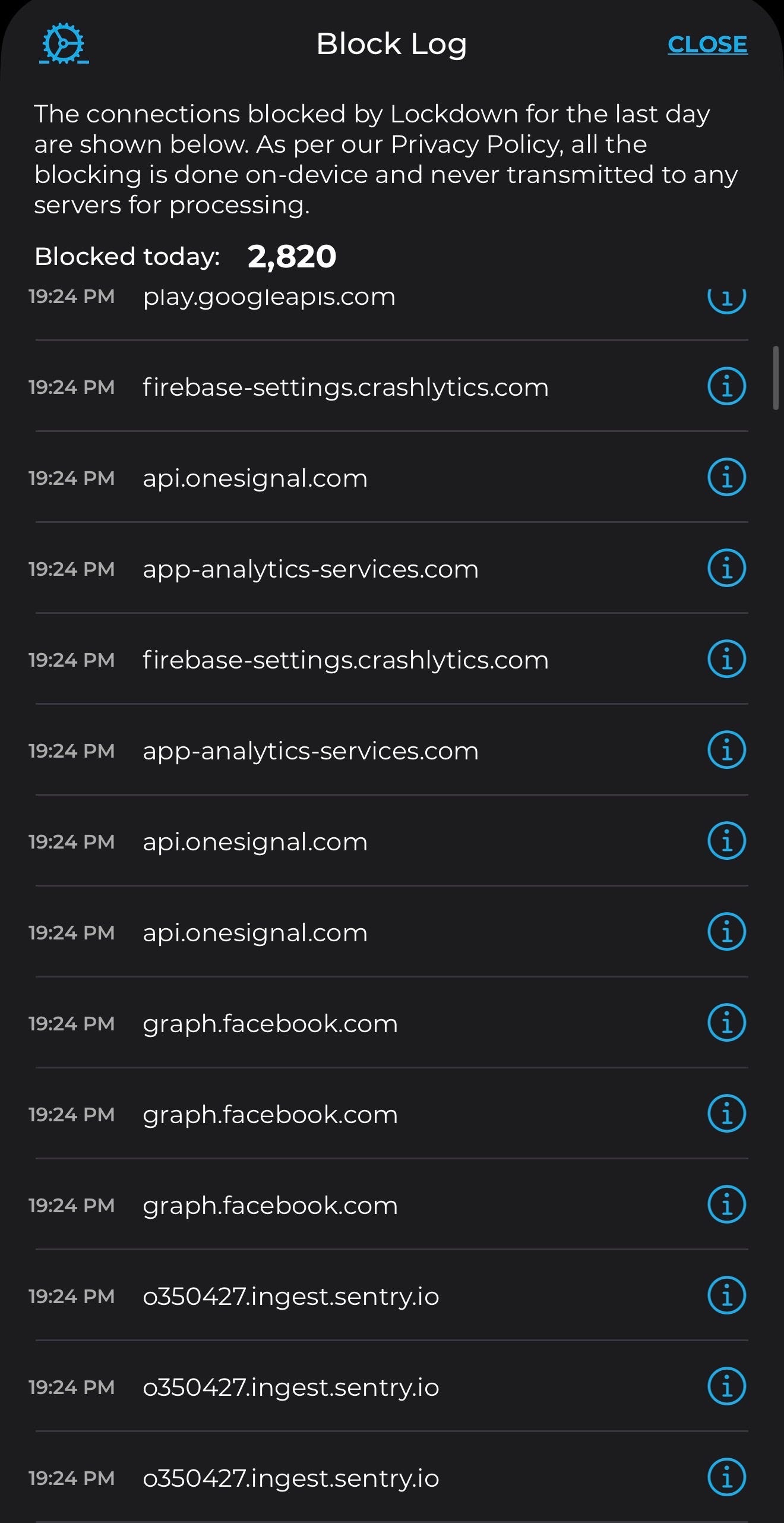
For those of you listening to the article, my phone has just tried to access graph.facebook.com and Firebase analytics, a Google product. Yes, the developers of iFunny have baked in requests to these sites for every time you launch the app. For all of the jokes about your phone heating up because its “mining bitcoin”, the truth is far less innocent and humorous.
Meta, Amazon Web Services, and Alphabet are the internet. When a third world country gets “the internet” for the first time, it’s almost always direct access to Meta’s surveillance platforms. After all, only megacorps have the surplus capital to lay internet cables in shitholes with little economic activity that needs access to electricity, much less the internet. These companies offer free “analytics” software suites to lazy and/or Low IQ developers like those at FunCorp for the same reason the Chinese willingly built factories to sew all of our poop emoji pillows: because it gives them enormous leverage and access to information as middlemen.
Let’s dig a little deeper. Google Firebase is a free developer platform that Google pays lots of engineers lots of money to maintain. In exchange for its sophisticated, prepackaged code meant to help developers with the backhole end of their sites, Firebase is given the keys to the kingdom. Every (emphasis on the microscopic detail and granular focus of “every”) piece of pertinent information will run through Firebase and “phone home” back to Google HQ where it will be archived for all time. The information users offer to apps they download is worth far more than the salaries of Firebase code monkeys and the servers it runs off of. In fact, that data has implications far beyond mere marketing and advertisement: it is actionable intelligence that can be exploited whenever Google feels like it. Like, say, when you vote for a candidate Google doesn’t like…. tents hands. It’s all amalgamated into a “ghost profile” where Google knows a lot about you, even if you’ve never touched their services. Or so you think!
Thankfully, Lockdown DNS was there to save the day (not sponsored) and block the connection to Firebase before I ever surrendered any information. In fact, my battery life and connection speeds improved because my access to FunCorp servers was effectively debloated at the device level. I’ll bring up Lockdown and other adblockers in the Recommended Practices section.
Note: I was forced to update my iFunny client after years and years of iFunny 4.0 (probably the best era) after logging in on desktop and bricking the app on my phone. With my adblocker on, here’s what my homescreen looks like. Note the lack of intrusive and annoying ads with hitboxes bigger than their screen real estate:

Let’s run through some more of the worst offenders across the internet, as I called them out in the title:
Ring cameras: Ring cameras get a special mention because of how awful they are. Millions of people spend their meager taxed incomes on cameras that record 24/7 at their most intimate places, their homes, for the convenience of being able to see when the Amazog guy drops off their Temu swimsuit. These things record to central servers and use AI for facial, voice, and other biometric identification and analysis. You don’t need to have one at your house to be in their database, especially if the neighbors have one facing you. Ring is now an Amazon brand, so their sophisticated intelligensia now gets to do whatever they want with the recordings of your daily life, including synthesizing transcripts of your recorded conversations with AI.
Meta Pixel: I just learned about this one myself, Meta Pixel is the engine of Facebooks’ near omniscient intelligence gathering operation. If you’ve ever wondered how Facebook can deliver “scary accurate ads” (I personally have never experienced this btw, which might be the best endorsement of my methods), it’s because Pixel is the fingerprinting service that follows you around the internet, generating an accurate profile even if you never visit facebook.com. For example, let’s say you visit Armslist.com (after reading Layne’s Guide to Guns perhaps…). If they use Meta Pixel, the site can assume you’re a non-liberal white American male between the ages of 18-65 with at least $500 of disposable income with high certainty. If you visit another site using Meta Pixel and present the same fingerprinting metrics (such as the GPU fingerprinting I describe below), the noose grows even tighter. Soon, they’ll know who you are with 100% confidence, even though you “don’t have a Facebook profile”. You do, even if this is how you’re finding out. You never signed up for a credit score either, did you?
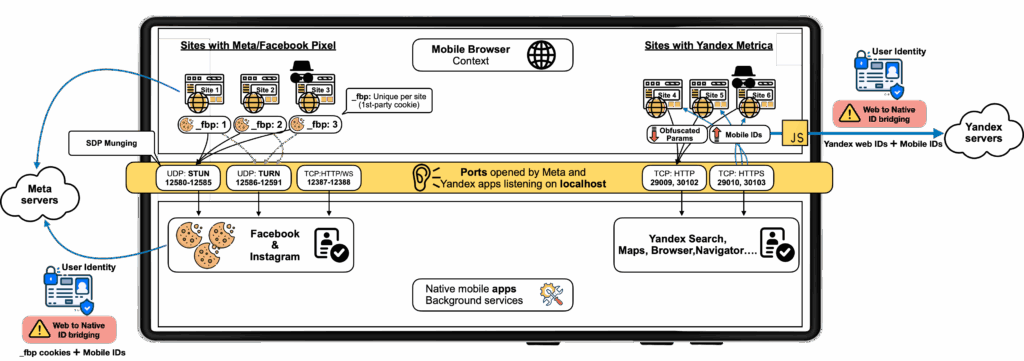
Port Listening: Here’s one that got past normies: Meta has been so-called “man in the middle” attacking nearly everyone on earth by intercepting transmissions between the user and the network through “port listening”. In a word, ports are the routes by which information flows in and out of your network. Meta tries to catch information as soon as it enters or leaves a port (bypassing privacy protections) to spy on you. Here’s a diagram:
AWS: Have you ever heard the true statement, “McDonalds is a real estate company that sells hamburgers as a side gig”? Well, Amazon is a cloud service provider that sells everything under the sun as a side hustle. Amazon Web Services (AWS) is far more profitable than the Amazon storefront in part because it powers roughly 1/3 of the internet by traffic volume. In other words, you have a 33% chance of touching an Amazon product merely by visiting any of the sites regular people go to. All of the above information about Google Firebase and Meta Pixel apply to AWS as well.
Google Widevine: Widevine is a Digital Rights Management (DRM) service that gets extremely invasive permissions for your browser or device, along with all of the information you touch. If you’ve ever wondered how Netflix blocks you from screenshotting, it’s Widevine. Unless you have a privacy browser installed and don’t use services that access Widevine (goodbye, streaming!), you’ve been giving Google access to every single thing ever on your screen, including what you’ve typed and probably what you’ve said within transcription distance of your phone.
Windows Telemetry: Windows does so much spying that it gets its own section. See further down.
Fusion centers
Speaking of things that shouldn’t be legal, let’s discuss these abominations. Fusion Centers (FCs) are the product of the post 9/11 neurotic spergout that also spawned the Department of Homeland Security, the PATRIOT Act, and a slew of other privacy invasions. Basically, the government realized that the (deliberate) compartmentalization of surveillance conducted on American citizens prevented all encompassing dossiers for widespread, joint analysis. For example, the FBI might get a warrant to search your house, but your cell phone or laptop might’ve required another warrant, and was maybe in the jurisdiction of another agency (or perhaps local law enforcement). This was all...inconvenient…
9/11 changed everything.
Note: I am of the opinion that some elements of the government knew 9/11 was going to happen— arguing against this is basically impossible especially when the plan was leaked just before kickoff to complete outsiders like Alex Jones. But, the number of American citizens involved was probably pretty limited and most people probably weren’t privy to the entire operation’s inner workings. Pearl Harbor is a worthy comparison.
I bring this up because FCs were born of a deep, enraged, psychotic embarrassment within the American government. Not from senior executive leadership, not from the Skull and Bones Bohemian Grove guys that secretly run the world, but from the unwashed oceans of middle managers whose careers in the “National Security” industry were proven completely redundant because all of their titles and programs and budgets and offices and compensation packages were reduced to rubble along with the Towers. Clearly, they were not invited to the 9/11 Towers Dropping Watch Party in Tel Aviv. It was a humiliation beyond words for the bureaucrats in “National Security” whose sole reason for existence was generating and filling out paperwork to “stop terrorism”.
Take a seat for a moment. We need to go on a tangent that will set the tone for the rest of the surveillance methods you’ll encounter in this article. Let me tell you a story in 3 Acts of what 9/11 was like for the true victims, “National Security” bureaucrats:
ACT I begins with middle managers across the federal government gazing at the cable news feed in worried consternation, watching the incinerated corpses of the victims drip molten skin off their bodies on live TV. Brows furrow while they witness dozens of innocent American office workers hurl themselves out of buildings to the gore flecked concrete below. Concerned gasps escape as the small match-like flame of incinerated janitors shriek in unimaginable agony, slowly succumbing to the pyro. They exchange nervous glances as the secondary explosive charges reduce fleeing secretaries and interns with hobbies and dreams and children to red mist. Amidst the horrors of the towers collapsing, one singular thought pierces their minds.
“oh my god….my career…. My Career!!! My…CAREER!!!! MY FUCKING CAREER!!!”
ACT II cold opens with Dubya center stage, climbing the smoldering ruins of the World Trade Center. He’s ready to deliver one of the greatest speeches in American history. Middle managers across the “DMV metro” look on like guilty children whose mother had entered the kitchen to investigate the empty cookie jar. All gaze in nervous anticipation from behind the rafters on stage left, terrified that the 9/11 Commission performance unfolding for the audience would reveal a failure on their behalf, that their department might be asked to testify before Congress, or that they, the Deputy Senior Vice Comptroller of National Suitcase Scanning Operations at the National Suitcase Scanning Center, might be found liable.
Thankfully, higher powers intervened. In the intermission, Bureaucraties himself descended from on high with a solution so vapid, so humorless, so nonsensical, hell, so wide-eyed batshit insane, that the underpinning bureaucratic framework must’ve been jawdropping. It was all the civil servants do to stand back in silent awe at his transfigured glory.
The Final Act begins with the chair of the Commission, Thomas Keane, smiling serenely and radiating paperwork from his very pores. He inhales, and the entire administrative world waits in bated breath. Tumbling out of his mouth comes one of the most pathetic lies in American history, that 9/11 happened because of a “FAILURE OF IMAGINATION”. And thus, nobody would ever, could ever, will ever be held responsible.
Boom.
With the kinetic energy of WTC 7 after a plane never hit it, the crowd goes wild! The FBI concurs with a knowing smile and a friendly nod from the front row, confident that they could miraculously find a Windows 99 computer with terabytes of disgusting CP on it for anyone that might’ve unpatriotically googled Operation Able Danger, a “simulation” of hijacked airplanes hitting the Pentagon. The moment the curtain fell on the 9/11 production, bureaucrats everywhere awkwardly leapt from expensive office chairs and danced terribly in their cubicles, nearly convulsing in professional ecstasy, tossing paperwork in orgasmic bliss. No accountability means more responsibility and FUNDING!!!! Time for Happy Hour!!
As the curtains close, IRS enforcer MRAPs squeal tires as if howling in their servile enthusiasm. Target: suburban America. They’re ready to extract the new taxes the illegal PATRIOT Act required. Free arrest records and curbside executions for any peasants who resist. Blood for the Blood God, Tax for the Tax God! The audience rises to their feet, roaring rapturous applause for these brave enforcers who are risking their lives in the line of duty so the Deputy Senior Vice Comptroller of National Suitcase Scanning Operations at the National Suitcase Scanning Center might have the necessary oceans of middle class tax dollars to manufacture new illegal laws in the name of counterterrorism.
FIN.
While I’m hamming it up a bit for comedic effect, I want you to understand that this is truly how these people think. The people making every day decisions about your security, and the national security, are career bureaucrats whose “profit incentive” means protecting their careers ahead of your lives. If you’re a normie, it’s probably a bit of a shock and you might find it hard to believe that people in the government are so hostile to their own constituents. Unfortunately, it’s all true. All those kulaks dying in 9/11 was a massive setback for their careers and aspirations of climbing the ladder of bureaucracy. Secretly, they all wished the involved unfortunates would’ve had the decency and patriotism to die in an alleyway mugging far away from their townhomes in northern Virginia. A slave who serves dutifully (with his National Security master in mind) would perhaps expire more tolerably (read: quietly) from Lyme’s disease or throat cancer.
In any case, the immediate danger might’ve passed for Washington’s middle quartiles, but the humiliation, embarrassment, and inconvenience persisted. They burned with seething hatred against those peasants who allowed themselves to get liquified by jet fuel without oversight and approval. The whole thing was really inconvenient, and it shined a spotlight on their austere posting within the Federal government as America collectively asked “didn’t we… have people to prevent… this?”. Those 3,000 deaths were like a bullet snapping past the foxhole of the Deputy Senior Vice Comptroller of National Suitcase Scanning Operations at the National Suitcase Scanning Center. It was too close a call to merely limp into the next powerpoint briefing without major changes.
Through gritted teeth and clenched fists they snarled their war cry against middle America: That’s right… This can.. NEVER.. happen again… FUCK the peasants…
Fusion Centers are the byproduct of this rage and embarrassment from the neurotic “National Security” caste in the wake of 9/11, the manifestation of all their pent up procedural rage and trauma. FCs are what we once mocked the Soviets and Nazis for having: secret listening stations embedded in major civilian living areas where people can be monitored without due cause or due process. “Fuck the peasants” is now the offiicial modus operandi for illegal, eternal “general warrants” against American citizens. Fusion Centers are a major cog in this burgeoning domestic surveillance industry. They are everywhere, all over the US, including in the biggest city near you. They now house supercomputers that are able to vacuum incomprehensibly large amounts of leaked emissions from your neighborhood, process it, and pass on the extracted intelligence to every connected agency (read: all of them) at once. Illegally.

The people in this picture are spying on you. For no reason. They will never tell you why they’re listening (or what they’re listening to), and they’d rather the public forget they exist. Finding one on a service like public GPS is difficult, and they are built to look like nondescript offices from the highway so as to not bother the American kulak on his 45 minute commute from the suburbs to Diversityburg. I’m willing to bet you didn’t know they existed at all, which is another example of successful narrative manipulation (against American citizens) for DHS. Something tells me the hardworking electricians in Smalltown USA would not like knowing there is a literal fucking command center in every major city in America staffed with low performers from the FBI, DIA, CIA, DEA, USSS, DHS etc. sitting around watching them through their routers for absolutely no reason. Illegally. Forever.
There was a brief period in the early 2000s where the government produced a bunch of propaganda to get the slave caste hyped about the Stasi loyalty assurance depot in their neighborhood:

But these guys are now squarely confined to the shadows. However, the early propaganda is worth going back and looking at. They showed a bit too much, for example, bragging about having illegal access to Automated License Plate Readers and illegally uploading the progress a vehicle makes across a net of ALPRs onto a joint spreadsheet, all about 15 years before that technology was considered commercially viable.
Nasty stuff.
GPU Fingerprinting
Websites have a lot of control over your computer while you’re hooked into them. They already have access to a metric shit ton of identifiable information about you (See the section on device fingerprinting for more info), but the problem is that this fingerprint decays over time and isn’t easily tied to other valuable information. For example, Walmart can freely see that a user in New York City is connecting on a Asus Laptop Running Windows 11 and Edge browser at such-and-such resolution (fitting the size of your screen) from a certain IP, in East coast time, at a certain time of day, and so forth. But, they couldn’t really do anything with this information other than generate a ghost file for that profile. GPU fingerprinting allows site hosts to force your GPU to complete small, invisible computations that produce tiny differences in timing, signature, etc. Once this is performed once, it is stored as a serial number or ID #. Once you visit another site also using GPU fingerprinting (most of them), they can share this information and nail you down as the same user. Here’s a good article on the topic. I’ll let them explain the technical details here:
Essentially, DrawnApart can generate a benchmark score for your computer’s GPU to supplement the existing fingerprint. The GPU benchmark can also be used to fingerprint individual machines, even when they use the same graphics chip. This is because "even nominally identical hardware devices have slight differences induced by their manufacturing process," which can appear in the rendering timing tests, according to the research.
Device Sensors and Loupe App
This is a bit of a tangent, but I implore you to download and look at the Loupe app on Android/iOS. Your phone is actually an array of sensors and emitters strapped to a powerful radio antenna. They’re basically walkie talkies on steroids, if your walkie talkie also had a gyroscope, a motion detector, a bluetooth emitter, a camera, a GPS locator, and about a trillion other datapoint collectors and emitters. They are positively radioactive (teehee) for your privacy.
Phone app permissions are getting better, but the Loupe app helps demonstrate all of the insane information apps can collect without a permissions prompt. All of those datapoints taken together are effectively a fingerprinted ID of you, your device, and your life. Put another way: apps can identify you with only the onboard sensors on your phone. There is no way to disable this, or even be informed that it’s happening.
This is typically where I incorporate a redacted screenshot of my own Loupe profile for all the chuddies that aren’t going to look at the app, but the information is so specific to me that I’m not risking it. Here’s the generic one from the app store for all you lazy ahhs:
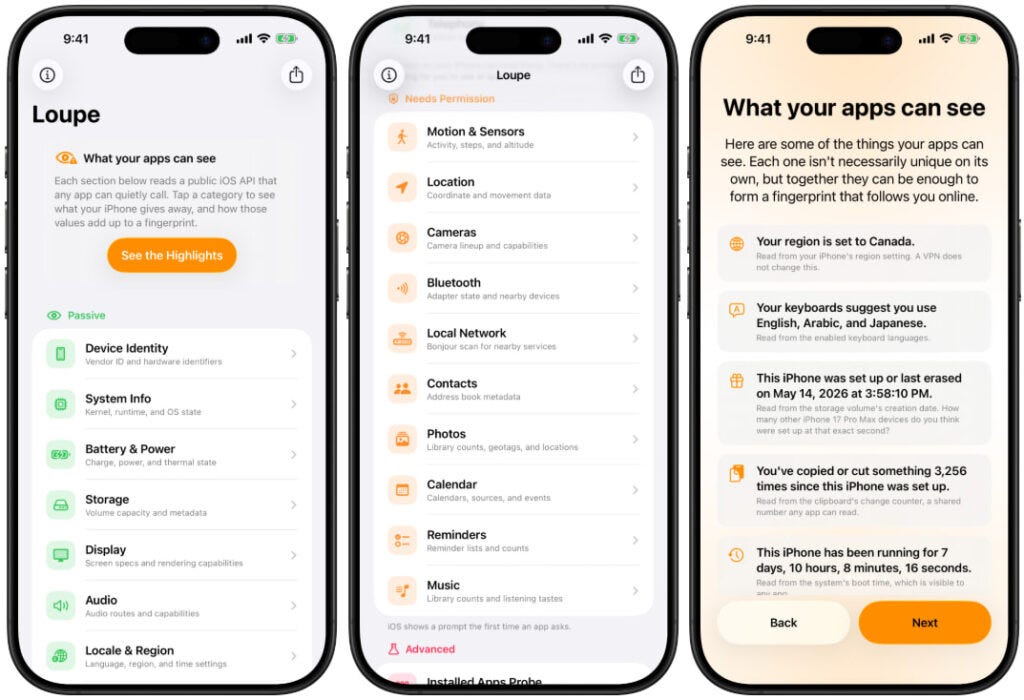
Note: I had my wife look at it on her phone and her response was “so what if they can see what region and language my phone is in”. Normies beware! Every app you download and website you visit gets a permanent copy of this information. What these sensors offer is plenty to generate, configure, and tie to a digital identity, fingerprint, or ghost profile. In fact, the issue is that there’s too much information, so “processing” it becomes boiling down the raw deluge of data into a singular digital footprint. We used this information to drone strike ISIS cannon fodder who made the mistake of connecting their IED detonator handsets (cheap Android phones) to cell towers funded by American tax dollars.
Lowering your profile makes it worse
Here’s a weird conundrum: like the human brain, surveillance systems want to identify patterns. Anomalies, deviations, and irregularities all serve to attract attention for closer inspection instead of merely shuffling by with “business as usual”. To use a low tech example, Alice in Chains singer Layne Staley’s body was discovered in his apartment because his bank was alerted he hadn’t spent any money in two weeks.
So, in your efforts to unplug from the Matrix, keep in mind that looking like someone who has something to hide might make you more interesting to Skynet than merely presenting as a normie. Where art meets science is coming up with lifestyle patterns that appear “business as usual” so as to not alert the dimwitted security drones while you go about your true business. You want the enforcers to believe you’re shuffling along, shackles rattling, with every other demoralized slave. Not emitting the things they’re looking for still reveals information about you, such as being smart enough (or trained enough) to recognize the information they want to collect and then actively evading it.
Another pertinent example comes from the embarrassing failure on both sides during J6. Many people were told beforehand to “leave their phones at home” because they knew the Feds had an enormous collection and analysis battery pointed at the Capitol (with stormtroopers on standby for anyone they could positively ID). True enough, but these are the same protestors who booked hotels under their real names with their real banking information!
In true 3rd world fashion, the Feds are complacent tyrants habituated to cry for their pacifier: infinite intelligence collection produced via gag orders on the banks and telecommunications companies. During J6, the Glowies were keenly aware that the overweight geriatrics they were trying to put in torture camps didn’t know how to offer any OPSEC resistance. “Leaving your phone at home” amounted to “leave it in the hotel room where it will constantly ping Washington D.C. cell towers and create a massive emissions hole because the operator’s expected lifestyle patterns aren’t present”. Or worse, they brought it to the protest “on airplane mode”. Your phone doesn’t even pretend it stops trying to use Bluetooth on Airplane mode, btw (see below).
The smarter play would’ve been to leave your phone at home with your friend, brother, or wife, with a brief tutorial on the stuff you normally do. Like, training your girlfriend on how to leave racist Substack comments at 12pm when you normally scroll apps on the weekend.
Bluetooth mesh
Bluetooth is another harmful vector for intelligence collection, as it is by nature proximity and time-based. Patterns of connection, device names connected, types of devices connected and other metadata are all extremely useful in identifying who the operator of the device is and what he might be doing. We live submerged in a constant ocean of Bluetooth signaling, and most devices quite liberally attempt to poll basically every bluetooth capable device in range. If you’ve ever “searched to pair a device” before, imagine the emissions spillage like zip tying a can of spraypaint and rolling it into a room covered in white canvases. Once you’re “tagged”, it is basically impossible to undo. We got a preview of this in the era of involuntary “contact tracing” during Covid.

“Verify email”
Companies that ask to “verify your email” do this because it confirms the address is active and accessible. Most of them will immediately turn around and sell this address to advertisers and the surveillance industry, especially if you linked it to a service registered in your real name (i.e. the utility companies).
Windows keylogging
The Windows operating system is malware. Anything, and I mean anything, is better than Windows. Yes, Mac is definitively better than Windows. Outside of being a poorly stitched together garbage heap in general, Windows collects granular intelligence (known as “telemetry”) on literally everything you do. Where you click, what you type, every session you create and end, every program you launch, and a ton more scary stuff that I don’t really feel like typing out. It all goes into a profile stored in Microsoft data centers around the world in a process loosely known as “store now use later”. There is no way to disable, opt out of, prevent, stop, or delete the information collection. Windows is absolute cancer on home computing, and a shitty operating system in general that is only popular because of regulatory capture and their corporate (read: debloated) deployments of Windows. And because nobody seriously develops software without Windows compatibility in mind.
Windows also ships with debilitating bloat, mandatory Copilot enrollment, and a bunch of other insane and invasive settings and programs (including Edge browser lol) that 99% of people will never spend the hours to debloat or troubleshoot.
I hate a lot of other stuff about Microsoft. They push digital ID verification for computer access, they are cramming AI into everything, they want your entire life to be a subscription service, they think they know better than you about your own computer, and so on.
Snowden Leaks
In 2012, Edward Snowden’s brave leaks revealed what everyone already knew: that the government only abides by its own laws when it feels like it. It definitely didn’t feel like following the 4th Amendment.
I’m sure you know the basics of the Snowden leaks, but I need to highlight two important facts for this article:
The Constitution is not going to stop the government, or government contractors, from doing whatever they want to whomever they want. Trvke: The Constitution (though I love it) is a piece of paper, it requires valiant statesmen to enforce its statutes. We don’t have any valiant statesmen today, and the politicians we do have are all terrified of the intel agencies. The power dynamic is the complete reverse of what it should be, and thus no politician is going to let his porn viewing habits get leaked to the press in exchange for a running joke called “the Constitution” that only poor and irrelevant people still care about. This article has a great snapshot in the horrifying and extremely sophisticated surveillance operations NSA runs through AT&T.
Back in the day, it was still worth bureaucrats’ time to pretend to care about Constitutional rights. Thus, they “came clean” by admitting the government was running surveillance campaigns against the citizenry, but only to collect metadata. Not only did their attempt at sleight of hand completely fail, as the 2012 Tea Partiers were mad any collection was occurring without a warrant (and rightfully so), it was actually a major tell about what the government finds important enough to illegally collect. Metadata is information about the message, other than the contents. For example, let’s say I send you a text message. Metadata about that message include the geocoordinates I sent it from, the time I sent it, the network used to transmit it, the device I sent it from, the recipient, the length of the message, the mirroring identifiers for the recipient’s device, and so forth. It turns out metadata collection is actually extremely invasive, imagine that! In other words, the government doesn’t need to read the contents of your encrypted chats. The metadata is enough to “put warheads on foreheads”. Back in the days when WhatsApp and similar services were actually end-to-end encrypted and not backdoored, we still fried tons of Jihadis using only their metadata. Saying “we don’t collect information, just metadata” is like saying “I don’t drink alcohol, I just sit under a table while the keg pours into my mouth”.
Watch this video for more information that came to light during / after the Snowden leaks:
Databrokers
The private act of collecting, processing, storing, and selling information about basically everyone on earth is a massive industry. So-called Databrokers are slick little Khajits that have made a multibillion dollar industry out of it. They know a lot about you, and are heavily incentivized to continually collect, process, and refine information about you to update their profile. The level of detail varies, but the paid services tend to be quite good.
Here, I’ll show you. I’ll pick a random name and city and see what comes up:
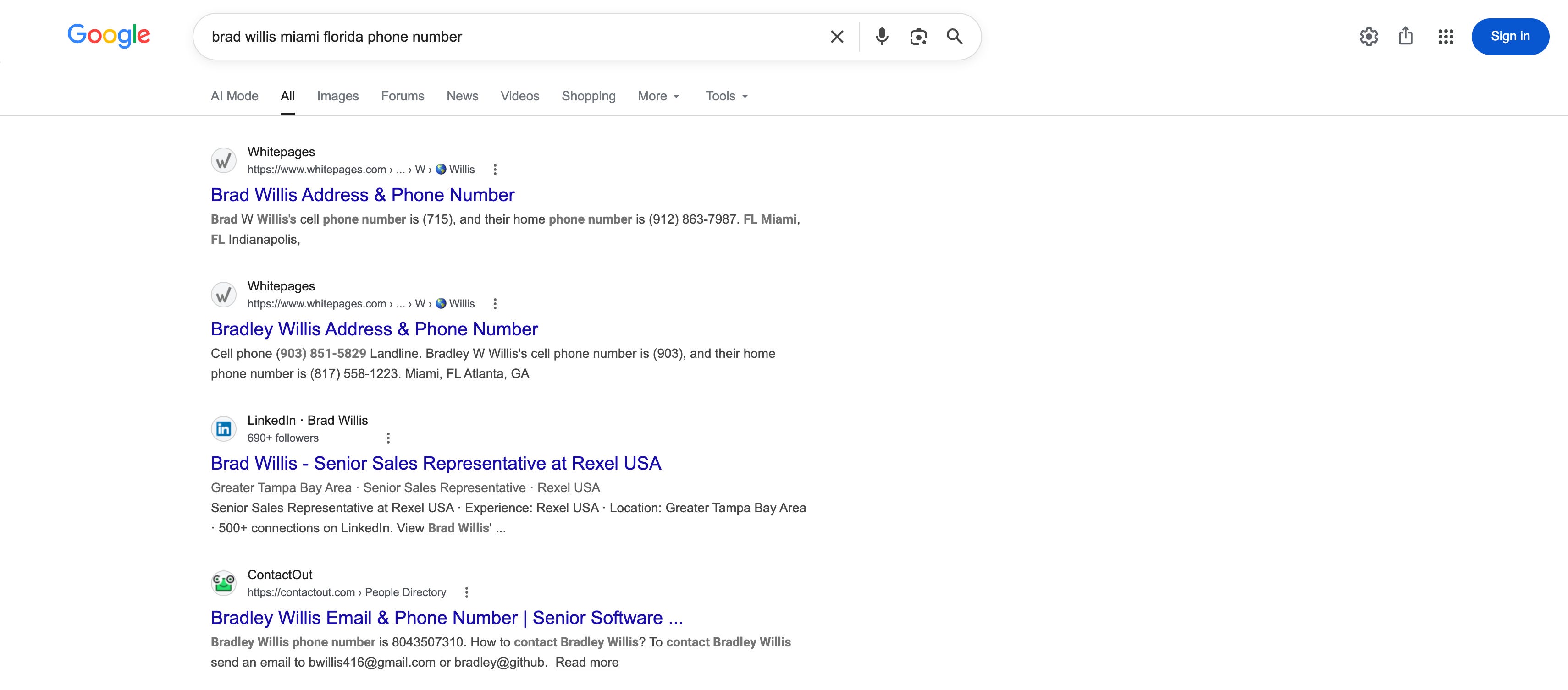
I have no idea whether any of this information is accurate. I’m sure you used to Google yourself as a kid, but this ain’t 2013 anymore. Databrokers are a lot more sophisticated and antagonistic than back in the day.
Recommendations: How to Mitigate Your Digital Footprint
Introduction: Who is the attacker, what is the threat?
Trvke: Anyone who tries to sell you a single privacy solution is retarded or a grifter. Privacy is not a product you buy, a service you use, or a way you set up your devices. Privacy is a lifestyle. And, in order to be successful at it, it needs to at least be a hobby. You need to stay up to date on the latest happenings, update things, implement new procedures, try new products, trim out bad products, and keep your homegrown “privacy program” as cutting edge and effective as it can be.
“Effective” is another loaded term. It’s quite relative. “Effective” against what? I hate to say it, but there is nothing I or anyone else can say, promote, or sell that can stop the American government. If the government wants to spy on you, it will. Simple as. If you think you’re getting gangstalked by the CIA, your only option is to never go near an electric device again. Note that I said electric, not electronic. Trying to “bulletproof” your laptop or phone against the intelligence agencies is a fools’ errand. There is nothing on the commercial market that can withstand a full pummeling from the NSA, FBI, CIA, or the other gaggle of glownigs. No, not even services offered in foreign countries, of which I recommend still several.
If your interest is decoupling from the American domestic (read: private) surveillance industry, read on. If your goal is to build a device capable of remaining truly anonymous from everyone on planet earth except yourself, don’t even bother. It’s impossible. Also, you’re not important enough to be singled out for monitoring by the FBI just because you googled the Anarchist Cookbook and joined edgy telegram chats.
I cannot say this plainly or seriously enough: you cannot, ever, escape the American government’s Eye of Sauron. There is not a single device capable of emitting electrons on planet fucking Earth that the NSA cannot see if they really wanted to. Not even a TI-84 in an airgapped Iranian nuclear laboratory at the bottom of a mountain. In Iran. Anyone who challenges this law of the internet is outing himself as an uninformed midwit that should be beaten savagely with blunt objects.
I am making this point crystal clear because I want to help you, and I want to ensure that your expectations are reasonable.
VPNs
VPNs became such a meme, especially with all the retarded content creator sponsorships, that they have wrapped all the way around the block to being underrated again. Put very simply, VPNs are a tunnel that disguises your traffic from (most) prying eyes by shielding the information that gets transmitted.
Here’s an extremely simplified example.
Let’s say you wanted to visit a site online. Oh, I don’t know, let’s just pick one at random…
What your opps can see without a VPN: your device → direct request through the network → laynearchive.substack.com
What your opps can see with a VPN: Your device → connection to VPN server (typically encrypted) → ???
This is a gross oversimplification because the intended audience for this article are complete noobs. VPNs are not a silver bullet, they are one layer of defense that makes it harder to track your footprint across the web. They also have the added bonus of spoofing your location, adding a layer of physical security as well. And you can watch Netflix content that is copyright prohibited in certain countries.
Note: Any government organization with serious cyber capabilities (i.e. the NSA) will punch through any VPN tunnel in seconds, if they don’t already have a backdoor built in or gag order for their records.
Consider them a worthy addition your arsenal, but don’t act like they’re magic. Also, they are a single point of failure that requires you to trust the VPN provider with all of the information you generate by visiting the web (a lot). Shady vendors (read: all free VPN providers) aggregate your data and bundle it for advertisers and databrokers.
As the old adage goes, if something is free, you are the product.
My VPN choice: Mullvad (by far). Mullvad has excellent server coverage across the world, stellar customer service, no-log service (they don’t keep records of your internet history, even for the government or themselves), 3rd party security audits, and even allow you to mail cash to have an account anonymously. Also, their CEO was recently “caught” funding an anti-immigration party in Sweden, so you really ought to patronize them.
Virtual Machines
Virtual machines are emulations of a computer system, ran either locally or over the net. Their practical privacy utility is that they’re an easy way to create distance and obfuscation from your true machine e.g. the one sitting in your bedroom. For example, I am writing this on a Macbook. But, I can VM into a Windows 11 machine with a web browser, and “fool” Substack into thinking I’m truly accessing their site from a Windows 11 Desktop. Add in a VPN (above), and now I’m using a browser I’ve never installed, in a machine I’ve never been on, hosted in a city I’ve never been to.
You can host VMs for free locally on your machine, though they are increasingly offered “on the cloud”. They’re becoming more and more popular in non-privacy settings, such as corporate deployments that don’t issue devices but want everyone to have the same (remotely managed) desktop. In fact, most VM uses are not typically privacy oriented. I use one on my Macbook when a website I want to visit only works with Windows machines, for example. It’s not a secret that there’s really a Macbook piloting the Windows machine.
A lightweight alternative is “containerized browsers”, that sometimes stream the VM to you in a browser tab. My recommendation here is kasm.
Note: The next evolution of privacy-focused VMs are VPSs, virtual private servers, which you can think of as carved out rentals of one specific server. You can run VMs inside the VPSs, or use it as a buffer between yourself and the wider internet. I use a VPS for several of my self-hosted projects (more on self hosting later). If the security of the service were to be compromised, all the attackers would gain access to is a server in a city I’ve never visited, booked under a pseudonym, paid for with a Privacy card (below), bridged back to me with a VPN tunnel. Meanwhile, my selfhosted resources are safely locked in my local machine that I can simply turn off the tunnel/power to. Bazinga!
Privacy.com
Privacy.com is a service that allows you to use “burner” cards in place of your real card. You can register these cards under fake names (technically), and add one more layer of obfuscation for what you’re using money for online or in person. Then, you can either destroy the card (eventually it will get recycled, adding another layer of obfuscation) or lock it into a single merchant. It works through all the major payment processors like Visa and Mastercard. Unlike Bitcoin, you can actually buy a can of Coke with the Privacy card at the grocery store. In fact, I’m pretty sure you can do the “tap your phone to pay” nonsense on the highest subscription.
From what I know, the service is pretty good, a little bit like a VPN for cards in that you’re not blasting your financial information into the wild for whoever happens to be listening, because all they’ll see is “PRIVACY.COM DEBIT” on the billing statement. Allegedly, they don’t harvest payment or banking information from their customers because they make their money off of subscriptions and transaction fees. Fair enough, if you believe them.
Like many other privacy services, you ultimately have to trust their word that their database can withstand 24/7 hacking attempts and that they don’t have a gag order from the government (one that applies to you, I should say) and that they don’t shrimply lie about what information their services collect. My methodology for this is to “dork” (use advanced Google search terms) around for lawsuits and other bad news for the company, then check their open careers listings to get a peek behind the curtain (imagine if they were hiring remote “privacy consultants” in Kenya for $15/hr?), and end with a quick company leadership examination to make sure the people that own the company are American, European, or at the very least not Indian. Privacy.com doesn’t have any Indians in executive roles, afaik.
If you look at Privacy’s most recent postings, their software engineer role requires the applicant to crack a cryptographic code to apply:
Crack the code
A hidden code is tucked into this application. Find it and enter it below to continue.
IyEvdXNyL2Jpbi9lbnYgcHl0aG9uMwoiIiJUaGUgYW5zd2VyIHRvIGxpZmUsIHRoZSB1bml2ZXJz
ZSwgYW5kIGV2ZXJ5dGhpbmcg4oCUIGVuY3J5cHRlZC4iIiIKCnBhc3N3b3JkID0gYiJceGVkXHhj
MSIKX2tleSA9IGIiXHhkOVx4ZjNceGVkXHhmYlx4ODBceGM0flx4YTdcblx4YjhceGZiPFx4ZmJP
Xlx4ZmIiCgpkZWYgZGVjcnlwdF9wYXNzd29yZCgpIC0+IHN0cjoKICAgIHJldHVybiBieXRlcyhh
IF4gYiBmb3IgYSwgYiBpbiB6aXAocGFzc3dvcmQsIF9rZXkpKS5kZWNvZGUoKQoKaWYgX19uYW1l
X18gPT0gIl9fbWFpbl9fIjoKICAgIHJlc3VsdCA9IGRlY3J5cHRfcGFzc3dvcmQoKQogICAgcHJp
bnQoZiJEZWNyeXB0ZWQgcGFzc3dvcmQ6IHtyZXN1bHR9IikKICAgIGFzc2VydCByZXN1bHQgPT0g
IjQyIiwgIkRvbid0IHBhbmljIOKAlCBidXQgZGVjcnlwdGlvbiBmYWlsZWQhIgo=
This is fun and cool and an effective proxy for an IQ filter. Well, until AI can solve it.

This process of vetting the company, its leadership, and its internal workings is important because in America the consequence for megacorporations lying about their services, especially their privacy policies, is almost always a nominal fine. Take Google for instance, who is paying a mere $425,000,000 fine for illegally spying on users who opted out of tracking and data harvesting. They did this in complete and flagrant defiance of their privacy policy. In fact, the fine was probably cheaper and faster than sourcing it from data brokers.
So, the real question you have to ask is, “what incentive does X company have to keep their word”? In the case of Google, the answer is “nothing”. Getting a slap on the wrist for juicy user data (that they kept in their ecosystem) means nothing to them.
For Privacy.com, the answer to this question is probably a lot more serious. For starters, Privacy.com and their investors don’t have the regulatory capture that Google does, meaning they could actually face serious penalties (e.g. prison time) for trying to flagrantly disregard the law and their Terms of Service. They are also a relatively new, relatively small company that needs to build positive PR and goodwill in the privacy industry, probably best accomplished by simply running a good service.
So, I’ve made the decision to hide most of my online payments behind Privacy.com. Yes, it’s a single point of failure. Yes, I am trusting them with sensitive (though not critical) financial information. In exchange, I am not trusting hundreds of websites to also not get breached with my financial information, and I get to fling a scoop of wet diarrhea on the canvas that is my digital footprint.
You have to draw your own conclusions about these services, ultimately. If you are a chud, I recommend (in a lokirkuinely non-legal advice way) conducting sensitive transactions like subscribing on Substack / Patreon / etc. behind Privacy.com.
Use Privacy Browsers
Your choice of browser, particularly on mobile, is probably the single biggest factor in whether your browsing is “private” or not. It sounds like a nerdy thing to care about, but consider your browser to be like the car that takes you to the various neighborhoods of the internet. Pulling up in the Microsoft Edgemobile to Laynestack would be like Ubering in an Indian’s leased Tesla with all of the sensors pointed at you. Using a privacy browser is a good way to swat away most of the industry-grade surveillance tools like spamming cookies, using trackers, GPU fingerprinting, and all of the other nonsense that has infected the web.
Because your browser selection is such an important choice, there is a lot of contention about what browser to use. To be honest, I’m not really the right guy to answer this question from a highly technical perspective. Instead, I’ll just tell you why I use Brave Browser:
As a a Chromium (forked from Google Chrome) browser, it works on every site Google Chrome works on. The internet is getting consumed by Chrome (and Chromebooks, and ChromeOS…), so that’s basically all of them. If you’re used to Google Chrome, Brave will look and feel natural.
It has “Brave Shields” up by default, with the option for aggressive tracker and fingerprinting blocking. I consider Shields to be the best feature of Brave. It’s a 0 effort, probably 80% solution (90% on “aggressive” blocking, which breaks some websites) to tracking that doesn’t require you to do a thing.
It saves lots of time and bandwidth (especially on cell data) by blocking connections to superfluous sites with Shield.
It gives you the option to send others “clean links”, links to sites sanitized of all telemetry and identifiers. For example, how Substack know that “[Layne A Jackson] sent you an article” when you share the link to this one.
It has an excellent polished interface for mobile, Mac, Windows gulp, and Linux
The default search engine, Brave Search, is pretty good and actually pays you in crypto (BAT tokens) to use it or watch ads. I don’t use the crypto shii.
The default AI model, Leo, is private and decently powerful
It’s FOSS (Free and open source software)
It’s a real project with a real dev team and some real cash reserves to do real development
Private browsing is substantially more private than other browsers. There is also a TOR browsing option, that I don’t use because I think TOR is stupid.
Some guy out there is probably screaming at me for recommending a Chromium Browser, or not using my platform to shill hardened IceCat or Vivaldi. I’m fine with Brave. I’ve actually gotten basically all of my friends and family to switch to it over Safari et al, which I consider a good deed for humanity. Every Layne Archive article ever written was on Brave.
If you want a second opinion from a fellow chuddy, this tier list is pretty good. Spoiler: He puts Brave in “Excellent” tier, one below “Based” tier, which I think is completely fair. If you switch from “Spyware” tier to “Excellent” tier today, you’ve already made enormous strides in privacy and self-sufficiency.
Monero
Monero is the last man standing in the “untraceable crypto” game. I don’t know too much about it, to be honest, but it’s out there if you want to try it out. As with other services, I think Monero is probably 99% effective against anyone but the American government. The fact several countries have tried to ban it is a testament to its true anonymity, but it’s up to you to DYOR.
Lots of my favorite Privacy content creators (Mental Outlaw) sing its praises.
“Dumb phones”
Dumb phones are a great option if you can commit to the bit. The best defense against extreme monitoring is to simply generate less information to collect. I recommend the Sunbeam Wireless F1 (not sponsored) as an American company (though I think the phones are made in China) that produces a viable dumb phone. It technically has the two things I can’t earn a living or really function in the modern world without: GPS and eMail. Though when I tried it in about 2021, the battery wasn’t very good.
Don’t blame yourself if you can’t stick with these, it’s a hard switch. The modern world is built on smart phones, and it’s a frustrating and humiliating experience trying to explain to your boss why you can’t scan the damn QR code or reply to his stupid Slack message.
._.
Linux computer
Merely not using Windows is a massive win for your privacy. Using Linux is even better. Linux is Le “Secret 3rd option” for the operating system your computer can run on. It is almost always free and open sourced (meaning anyone can look at the code to see what the developers are doing). Linux is lean, efficient, and objectively superior to Mac and Windows for perhaps 60% of use cases (with a few important caveats such as Adobe suite productivity (Premiere), NVIDIA graphics card support for heavy gaming workloads, and a couple others) merely by virtue of having very little “bloat”. None of the major Linux distros (flavors) contain telemetry or spyware, and even if it were compromised people could just fork (clone) it and make a new one without the spyware.
The tradeoff is it’s a little like learning a new language, you’re starting from scratch and having to teach yourself how to navigate around and wield an operating system a little different than the one you grew up with. Still, in the era of infinite LLM advice, this is easily doable.
Linux is surging in popularity as it transitions from a sort of niche hobby OS into something real that normies can actually use. Companies like Valve are providing the massive R&D manpower and funding patronage to break through some of the friction with Linux, which has historically suffered from lack of professional support at all— to say nothing of the armada of techies that maintain and develop Windows and Mac.
The Big ‘26 is truly the mythical year of the Linux desktop (nearly 3% of people use Linux these days, soaring from <1% a few years ago). I highly encourage you to give it a try, even as a weekend perspective broadening side quest that you abandon on Monday morning. If your IQ is above 75, installing and operating Linux these days is trivially easy. It’s an investment in your privacy, data ownership, computer ownership, self sufficiency, and self respect that will be richly rewarding.
Recommended Operating Systems:
For “I use my Chromebook for email, Amazon, and web browsing” Normies: Mint
For one level above that: Mint, CachyOS, maybe pop!OS
For “I need it to look exactly like Windows for my feeble Microslop brain”: ZorinOS, Mint
For Gaming: Bazzite, SteamOS
For “I want to selfhost or do some sort of development or tinkering”: Ubuntu, Debian, Mint
For “I am a mega autist that needs a new fixation”: Arch btw
For “I actually think a state actor is trying to kill me”: Probably OpenBSD or maybe TailsOS
For adding Rust to the Linux Kernel: kill yourself.
Fun facts:
AndroidOS is a closed source, hardened software based on the Linux Kernel. I believe modern MacOS is technically Linux somewhere under the hood as well
Every server on earth runs Linux (headless Ubuntu) because Windows (even Windows Server) “wobbles” and becomes less stable the longer it runs. There are Ubuntu deployments with runtimes measured in decades.
Linux was created and still maintained by one dude, a feisty Finn named Linus Torvalds.
The penguin mascot’s name is Tux
Self hosting
Self hosting is the act of running a program with hardware that you own, usually in your house. This is the ultimate privacy and self-sufficiency nvke that really deserves its own article. If enough of the unenlightened masses plead for salvation against my self hosted fortress drawbridge, I might write it. Until then, take this excellent primer YouTube video from one of my favorite channels, Lawrence Systems:
Suffice it to say, self hosting is a huge privacy win. The moment you transition from, say, ChatGPT to Ollama, or Google Photos to Immich, you’re sealing off that part of your life against the forces of evil for good.
Friends and family
A chain is only as strong as its weakest link. As a newly enlightened internet patrician, you need to be able to sell your friends and family on some of these practices. They don’t necessarily need to go out and reimage their computer for a Linux Distro (they should tho), but they need to avoid some of the most egregious practices. Otherwise, you’re fighting an uphill battle. Friends and family can actually wipe out a lot of the progress you make, btw. If they, for example, “sync contacts” (see below) on Facebook, you’re getting added to the network whether you like it or not.
If you’re the leader of a household, you need to lead an exodus to Privacy World with grace, knowledge, and confidence. If you’re not, you should try to influence your patriarch into foregoing the biggest privacy violations. Even a couple “small” concessions (say, abandoning Alphabet products and switching to Brave Browser) are a huge win for your privacy and liberty.
No contact syncing
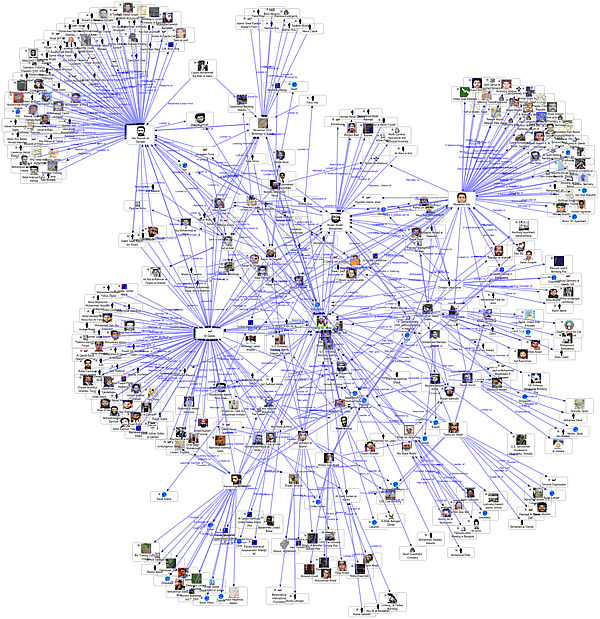
Contact syncing is offered by every app ever as a way to “find friends” conveniently. It’s actually a way to map social networks using a highly sensitive, largely unchanging, unique string of data about you: your phone number.
Like I said in the above example, you are still going to be a datapoint in this network if your friends and family sync contacts. In fact, true surveillance professionals know to attack “soft targets” (your normie friends and family) if you’re presenting as someone who knows how to evade the common forms of surveillance. Why bother targeting your device when they can look at the social graph generated by friends and family “syncing contacts” to see what number Timmy Chudsworth is saved under by 50 different people?
Don’t ever do it, and don’t let your friends and family do it either.
Disguise and obfuscate your phone number and email
Your phone number is one of the most important facts about you, as I’ve said a few times. Hide it when you can. For services that require it, consider a VoIP (Voice over IP, basically calling through Wifi) number paid for with a Privacy card. Rotate it for a new number perhaps once a year and your tracks will be covered as the numbers get recycled to other users. Ideally, you segment out phone numbers by purpose: one as a “burner”/disposable for signups, one for work, one to give acquaintances you meet, and your true SIM number for friends and family. If you’re being a good chuddy and rotating those VoIP numbers yearly, this can become quite the project.
I shouldn’t even have to say it this deep into the article, but do not use shit like Gmail. Self hosting email is actually pretty difficult (everything gets marked as spam without a trustworthy DNS) , and so I’ve decided to try out the Proton ecosystem for a year or two to see how it goes. It’s been pretty good so far. One of the strengths of Proton’s paid email product (Proton mail) is that it generates infinite disposable email addresses to hide your true address, thus hardening your online presence against fingerprinting. Email aliases are a powerful and easy boost to your privacy.
For example, let’s say you wanted to sign up for Sports Illustrated, a dying novelty that will almost assuredly sell your active, American, middle class email address to Indian data scrapers for a few dollars.
Instead of entering your true address (which, like your phone number, should only be used with family and close friends), Proton Pass generates an alias, something like:
sportsillustrated985713.niggers@passmail.net
All of the traffic received at this address is forwarded privately to your true address. So you can check TimmyChudsworth@pm.me from your phone and still get the “verify my email” link for Sports Illustrated. Then when they sell “sportsillustrated985718.niggers@passmail.net”, you can disable that alias or block Sports Illustrated marketing emails, all while preserving your true identity.
Use LLCs, Trusts, and PO Boxes
This is an old school “tradecraft” glowies used to obscure sensitive locations. It’s not very secret if you order your Camel ciggies to “FBI LISTENING POST ANYWHERESVLLE, USA 69420” after all. Famously, the Los Alamos Manhattan Project site was mundanely listed in WWII era directories as “PO Box 1663”. There are many, many others, like the aforementioned “Room 641A” the NSA ran a listening station out of in a random AT&T building.
Some states and jurisdictions will even allow you to pay in cash, or not use your real name when registering a PO Box. If your state requires your true name, you can combine the PO Box with an LLC or Trust to further obscure who is actually checking the box. Some states (Wyoming and Delaware, IIRC) allow anonymously / privately registered LLCs. Many Real Estate Trusts also don’t require board members (you) to be named, obfuscating who purchased the house. In the old days, establishing and managing the trust was a difficult maneuver that typically required financial advisors to do it for you. For example, Layne Staley’s financial team purchased his Seattle apartment under the “John LaRusta Trust” to prevent fans from finding out where he lived. Yes, this is now the second time I’ve managed to work Alice in Chains into this article. Lol! These days, trusts pretty easy (though expensive) to set up on the internet. When I scrape together enough goycoins, I plan on buying my house under a trust.
If you want to make privacy a lifestyle and a hobby, as I recommended, that means no Amazon purchases to your house—lest Amazog know where you live. It needs to go to a PO box.
Check your car
Cars are now basically computers on wheels. The newer ones are jammed full of entirely electronic controls and telemetry sensors that are quickly becoming as bad, if not worse, than phones for privacy invasions. We’re all just sort of getting used to cars that have their own wifi, their own cell service, their own GPS, their own infotainment systems onboard, etc. so most people aren’t really on the lookout for their cars trying to spy on them.
Beware: Cars can collect a shit ton of information about you, and if they’re connected to a network, they’re always transmitting this data to nefarious actors like the manufacturer and data brokers. They know your:
Provided biographical information: name, favorite locations, home address
Unprovided biographical information: age, height, weight, grip strength, foot strength, balance + coordination, visual acuity, seat height preference, etc
Reaction speed
Depth perception
Risk tolerance
Decision making process
Routines and habits on everything from how often you fill up (and what pump you go to) to how much your groceries weigh
Daily life patterns such as how long you spend at work (and where you work), when you go home, and any hobbies that take place at a GPS-marked location
General willingness to break minor laws (ever rolled through a stop sign? Your smart car remembers)
Music choices and whatever else the infotainment system gleans
This is just stuff I can think of off the top of my head without the help of an LLM. There’s also heinous programs like so-called “safe driving” initiatives where marks opt in to sharing this information with insurance brokers to nominally save money until it notices you press the brake pedal too hard.
Most of these cars have some settings to opt out of the worst telemetry but, as we’ve established, most megacorporations (all auto manufacturers) are content to pay the fines in exchange for such delectable intelligence gathered on you. In fact, they use this information to subsidize the cost of producing the car.
There is hope: modern cars still have manuals that can show you what cables to snip for the external communications capabilities, but remember this will almost certainly void your warranty and insurance companies will likely sperg out if they know you did it on purpose. In 10 years, this will be a felony, so if you’re willing to accept the risks I would do it sooner than later (not legal advice).
Btw, the Biden administration crushed the so-called “Killswitch law” through congress that requires network connected killswitches in every new vehicle (starting in model year 2027, i.e. this year) so they can remotely access your vehicle. Ostensibly, this is to “stop drunk driving”. The actual purpose is so they can remotely operate your steering wheel and suicide you for noncompliance, a tradition that is known as the highest award in journalism. It goes without saying that a WiFi connected steering wheel is a privacy and survival nightmare, and those stupid enough to use one are liable to receive the second highest award in journalism, the Darwin Award.
Because this still isn’t enough control for the National Security people (yes, the same ones from the 9/11 story, literally the same individuals that still work there 25 years later) , the latest round of new regulations includes a proposed literal fucking retina scanner that watches your eyes as you drive to determine if you should continue to receive access to your own vehicle. Unbelievable.
This is a hill I’m willing to die on: I will drive old cars forever before I pay my own taxed money for the privilege of operating a surveillance-mobile. I hope you feel the same way.
Note: If you drive or frequently ride in a Tesla or other EV, go ahead and stop reading this article. It’s already over for you.
Opt out / enable privacy settings
This actually does help, believe it or not. Most companies are actually willing to honor opt out requests (mainly because aggressive lawyers do farm class action suits against companies that flagrantly ignore them); you shouldn’t believe you’ve saved the day by unchecking the box for “sending helpful data to Microsoft” on your PC.
Get a guide for your device and spend a few minutes opting out of whatever you can, it does make a difference.
Use a local DNS blocker or adblock list
As I mentioned earlier, visiting a site is not a straightforward affair. Attempting to visit, say, CNN.com, really connects you to about 50 other sites that you’re never meant to see. They’re not sites that you can visit, they’re there to learn about you.

Using an adblocker stops all of this nonsense, saves bandwidth / electricity costs (marginally), gets you better connection speeds, and spares your battery. Oh, and it’s great for your privacy.
I already recommended Brave browser, which has an excellently maintained adblocker built in. This works well on mobile as well. For non-browser applications, you’ll have to have an adblocker running natively on your phone. I use Lockdown, a “VPN” that sits locally and blocks a curated list of known advertiser addresses, as well as about 100 others I’ve manually blacklisted. For iPhone, looking under “app privacy report” will show you what iFunny or other apps attempted to contact. Then, you rinse and repeat by blocking them on Lockdown. I’m sure there are other adblocker services out there, but I’m happy with Lockdown and it’s free.
Lockdown has blocked 38,000,000 advertising / spying requests since I started using it in about 2018.
Use Pseudonyms and online personas
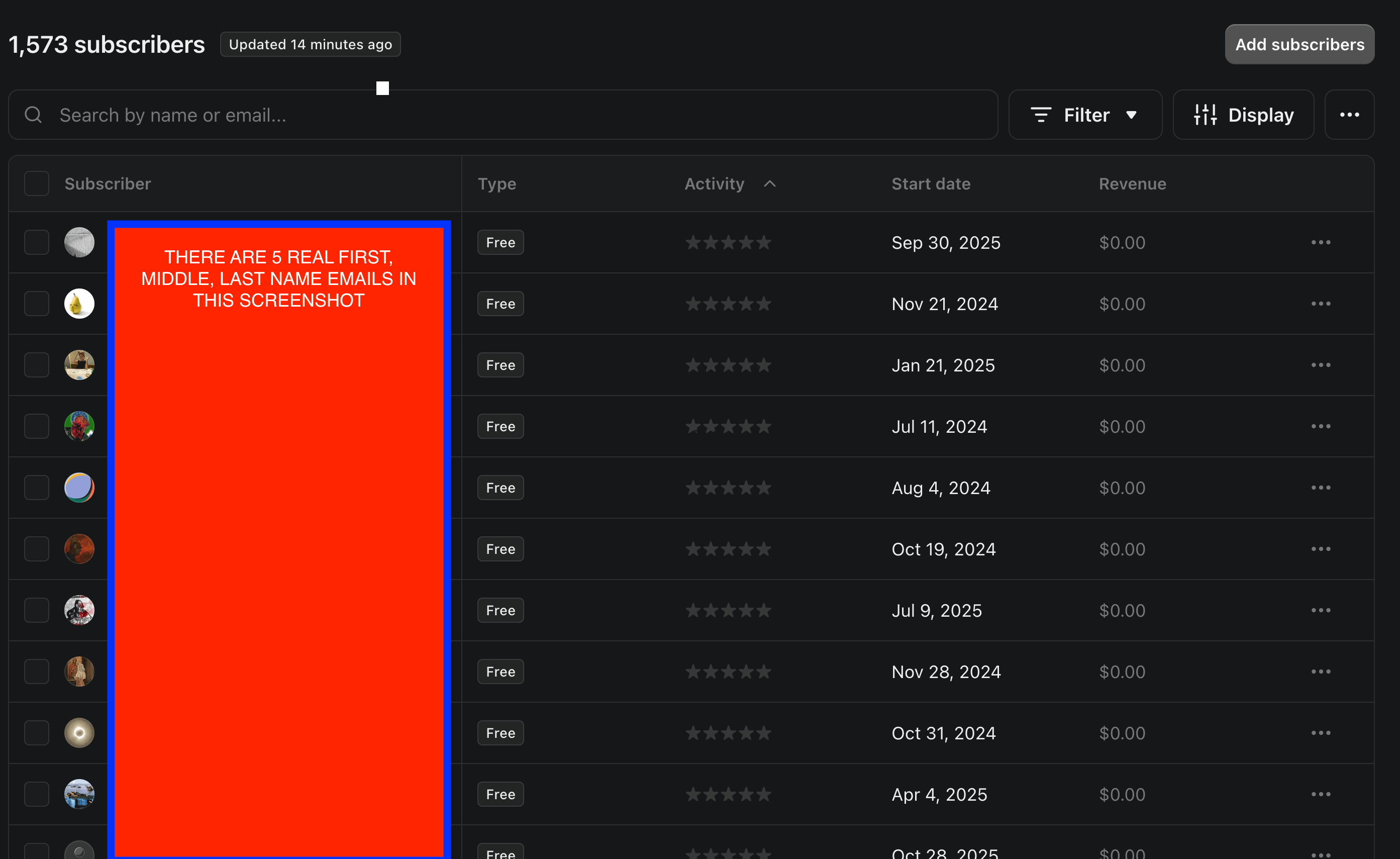
I honestly can’t believe I have to say this. There are about 30 chuds, right now, that are subscribed to my publication with their real names in the email. Like, I could go pull John.A.Smith@gmail.com out of a hat if I really wanted to. I’m entitled to that information, after all. You provided it to me!
I’m begging you: if I’m talking to you right now, please change your email address. I don’t care that you don’t care if people know you’re subscribed to Layne Archive. You gain nothing by surrendering one of the most important and exploitable things about you: your legal name. Now you’re trusting me, Substack, Amazon Web Services, and every other bad actor lurking in the middle with this information. Forever. What if I’m not feeling charitable with this information? What if I, idk, posted a screenshot of who is subscribed to me, as I am perfectly entitled to do?
Never register for anything in your real name unless you absolutely have to. Don’t do it with restaurant reservations, don’t sign up for the theme park under your real name, don’t even make an account with Chick Fil A rewards in your real name. To do this correctly, you need to be aggressive and thorough. Ask yourself: why do they need my name? Ponder it for a while. Why does Spotify need my real name? Why does Microsoft need my real name? Why does Tinder need my real name? There is no law saying you have to provide it for most vendors (afaik), and if you’re a good noodle who meekly complies with the request for your name, you’ll be rewarded with this hugely important fact about you getting bought and sold, along with your digital footprint, in an automated bidding process the moment it hits the online SQL database. It’ll be transmitted to subcontractors in India forever faster than you can ‘click to verify your email’.
Unless you are doing something that legally requires your actual name e.g. ordering firearms online, do not surrender this information. You can’t put the toothpaste back in the tube once it’s out. Google licks its chops at the idea of someone using “john.a.smith@gmail.com” on Chrome where their ghost profile can be conveniently updated.
You can use a username with no connection to you (not a favorite sports team, or B-list 90s band singer…) or just generate a pseudonym. If you can keep the charade up for a while, you’ll produce an online persona with a digital footprint that you can manipulate to your advantage.
Farraday cages
Airplane mode does not do what you think it does. Phones in airplane mode still collect and emit some information. If you really want the phone to stop recording and transmitting, it’s a lot more complicated. You can start by putting it on airplane mode, popping out the SIM card (I wonder why the industry is moving to digital eSIMs?), turning it off, and then putting it in a Farraday cage, a contraption designed to block most (though not all) electromagnetic fields.
Note: If you’re wondering why this is so hard, it’s because they don’t want normie devices to ever stop transmitting.
Farraday cages basically create a black hole around electronic devices that are extremely hard to pierce. They also have the added benefit of protecting electronics from so-called EMP attacks, which would most likely come from a solar flare that would send the developed world back to the year 1850.
Ideally, you leave your phone in a Farraday container at night so it can’t record and collect on you while you’re asleep. In a perfect world, all telecommunications capabilities (including internet) are segmented into a single “hot room” in your house, where you’ve built a Farraday cage around it to prevent leakage. This is highly impractical (especially if you have kids or like watching TV outside of a literal Cold War bunker setup), but it’s how you should be thinking.
Make sure you get a real one (or make your own) and don’t bite on the Amazon slop “Farraday bags” that don’t work. I bought one of these when I was younger, placed my cell phone in it, zipped it up, and felt awfully smug about how ZOG couldn’t get me now.
My phone rang a few minutes later.
Delete Unnecessary Apps
Consider downloading apps to be like living with bad roommates: once they move in, they sit on your couch and get awfully comfortable. Most apps are quite invasive, like a pushy roommate who eats your leftovers in the fridge without asking and pulls your receipts out of the trash to see what you’ve been buying. Some apps, any that have a reasonable profit incentive to collect and sell information you provide (read: any social networking app) are far beyond that. Meta and Alphabet products (Facebook, Instagram, WhatsApp, Gmail, Google Docs, Google sheets, Google whatever) are like a gaggle of 50 Indians and Subsaharans breaking down your front door and stealing from you, raping you, and murdering you all at once. Yuck!
Routinely prune your phone’s app selection to only keep apps on board that you actually use (a good rule is whether you organically launch them at least once a week). Actually delete the ones you don’t, don’t just hide them on the homescreen or whatever.
If you must use these services, btw, do so in a privacy browser and not in app.
Sign out of browsers and profiles
This is another small thing that does help. If you do need access to Google search, for example, (Brave is less powerful, in part because it isn’t spying on its users), don’t do it signed in. If you need evidence of the insidious nature of Google, sign out of your account and use their services for a bit— you’ll be bombarded with requests to sign in, perhaps in exchange for “free cloud storage”. Once you sign in to something unrelated, like Google Docs, all your searches will be tied to that account.
Try RSS Feeds
RSS feeds are like old school social media. You register sites that you’re interested in, and your singular feed will populate every time that site has new content, or the site authors publish to their RSS feed. Then, you can view it in your preferred RSS app as a safe container that can’t or won’t load the trackers and bloat typical webpages have. They can even bypass article gating on certain feeds. Imagine it like Reddit, where all your interests are aggregated in one profile, but it’s not limited to only Reddit sites.
These are great, and they’re rightfully making a comeback.
Immediately Sledgehammer all “Internet of Things” devices
If you having a fucking “smart fridge” or anything of that nature, go ahead and hit one one of these:

They are about on the level of a Windows desktop for pure radioactive leakage and telemetry collection.
Search for exposed IoT devices waiting to get rekt on shodan.io
Things that don’t work
I can’t start to wrap this article up without mentioning some practices others recommend that I don’t. These are all either ineffective, outdated, or flat out retarded in the Big 26. Of course, you’re reading my perspective with my biases; you’re welcome to DYOR and draw your own conclusions.
TOR network
TOR network is what high school edgelords use to obfuscate their ‘chan browsing. The gist is that many volunteers offer to serve as a node and/or host for traffic. Nodes are chosen by the network at random, and each part of your traffic is “tumbled” so that no one node or network operator has access to your traffic.
I feel bad for disavowing TOR because there are lots of good people serving as relays on the network who think they are making a difference. Trvke: like the actual internet itself, TOR is a government project. Many TOR nodes are hosted in and around Washington, D.C. and your chances of using it to buy drugs or sex slaves without RNG stumbling onto a government node are quite small. I think it doesn’t hurt as another layer of security, but don’t get any false ideas. Someone, somewhere in DC is sniffing a lot of packets.
Like Bitcoin and Pirate Bay, many criminals and political dissidents have been caught because they thought TOR was safe.
Airplane mode
Already discussed, but wanted to mention it again here. TLDR: if your phone is not physically incapable or blocked from transmitting, it is.
Android Phones
Here’s my second Apple iTrvke to descend on the readers of this article: Android phones are intrinsically insecure, and iPhones are intrinsically secure. This is a very technical debate that neither of us is versed enough in to represent our sides well. Instead, I will remind you that Android is a Google product and leave it at that.
Privacy Services
Like I said earlier, privacy vendors are not going to be what makes you “private”. Privacy is a lifestyle. Services like Incogni, Aura, DeleteMe, Norton, McAfee (Lmao0 and others are grifters at best and outright scammers at worst. For example, Incogni is a service that offers to submit “delete my data” requests to data brokers. The problem is, you have to fork over all the sensitive information to Incogni so they “know what to look for”. Incogni’s parent company, Tesonet, owns Oxylabs, an extremely aggressive databroker.
Most jurisdictions make data brokers honor opt out requests, but they are typically allowed to make it as convoluted and annoying as possible. Also, sometimes they are allowed to relist you after a cooldown period. There are hundreds of databrokers, each with a deep well of information that I guarantee they aren’t sanitizing even after pinky promising to self-delete all the juicy intel on you that they paid for or scraped. What is their incentive to do so, that you might sue them?
I don’t have a good final solution to the data broker problem, I just wanted you to be informed of the woes of these services.
Further Reading / Resources
YouTube:
https://www.youtube.com/@addielamarr
Easily the best privacy YouTuber for normies
https://www.youtube.com/@BennJordan
Privacy adjacent, but spearheading the Youtube anti-Flock resistance
https://www.youtube.com/@MentalOutlaw
Funny, consistent uploads on relevant topics, looks like Jayson Tatum.
https://www.youtube.com/@TheHatedOne
https://www.youtube.com/@ProtonPrivacy
Another Normie-friendly packaging of privacy content from the same people that run Proton services
https://www.youtube.com/@BarelySociable
More internet mysteries than privacy, but his investigative research on the early internet will show you more about how the good guys, the bad guys, and the Glownigs made their moves. An excellent chronicler of the Wild West era of the internet.
https://www.youtube.com/@Coffeezilla
The grim reaper for corruption and online scammers.
https://www.youtube.com/@ExplainingComputers
An OG British YewChyewba that is a delight to listen to.
https://www.youtube.com/@LukeSmithxyz
More on Luke below
https://www.youtube.com/@robbraxmantech
Websites
https://www.privacyguides.org/
This is one of my favorite Internet people, an Orthodox Christian computer programmer and classical linguist who is contrarian to a fault. Luke doesn’t use deodorant, listens to nothing but silence when he drives, and only uses an old ThinkPad to run Linux. His recommended links are worth exploring. I particularly like based.cooking and landchat.net
He comes from a dying breed of software guys that still think “less is more”, and that the sign of a website’s quality is how skeletal it is.
Alternatives to major software programs that “suck less”.
https://spyware.neocities.org/
A great repository of exactly how many major softwares spy on you, all packaged in a retro neocities website. Sample their instagram entry to see what I mean.
Note: Brave browser catches a stray with a “high” spyware rating here! Then you read the reasoning and realize these guys are a little schizo.
Nukes your account by logging in as you and scrambling every post and comment with nonsense.
https://github.com/jmarmorato/Intranet-Home-Page
An excellent foray into home intranets (not to be confuzzled with “internet”).
Conclusion: I’m Not Paranoid and Just Do Your Best
I’m not paranoid. I live a normal life where privacy is now a “hobby”, not a fixation or obsession. I don’t think the glowies are after me, I’m just a regular guy who doesn’t want to be spied on. This is a reasonable desire, especially as an American.
If you’re taking the plunge, especially after reading the article, know that others in your life will give you one of two responses: apathy (“that’s not necessary”) or uninformed concern (“why are you worried who sees what you do online?”). Unfortunately, being cursed with this knowledge can be a very isolating ordeal as others notice the changes you make but cannot (or will not) make them themselves.
My advice: just do your best. Privacy is an uphill battle against evil forces unseen. We’re all probably already cooked, so just make the small changes that you can handle to triage the damage. I still use YouTube (probably too much). I still log into my Normiegram profile every once in a while, it’s the only way I get sports news. I don’t even use a VPN to access my Substack account anymore. Maybe I should, but I’ve already made the biggest gains in personal privacy by using services like Privacy.com
Just do your best. You’re going to die eventually.
I was expecting this article to be a lot worse. I thought it would be really schizophrenic and demanding I move to the Galápagos Islands and only use some weird old obscure computer with 50,000 different open source programs and extensions and APIs that I need to set up so I can play Medieval 2 Total War without the government kidnapping and anally probing me. Because that’s what most “how to maintain your privacy” articles feel like to me.
No, this was actually pretty levelheaded and realistic. Maybe a little fatalistic, but not defeatist. Most of the suggestions were pretty practical and I was doing a surprising amount of them already. I also felt this one stayed on topic and had a breezier tone than some of the other articles you’ve written, which is good. 👍 wolliver gives the thumbs up
Nice. Another great thing about Brave is that it supports uBlock Origin.